


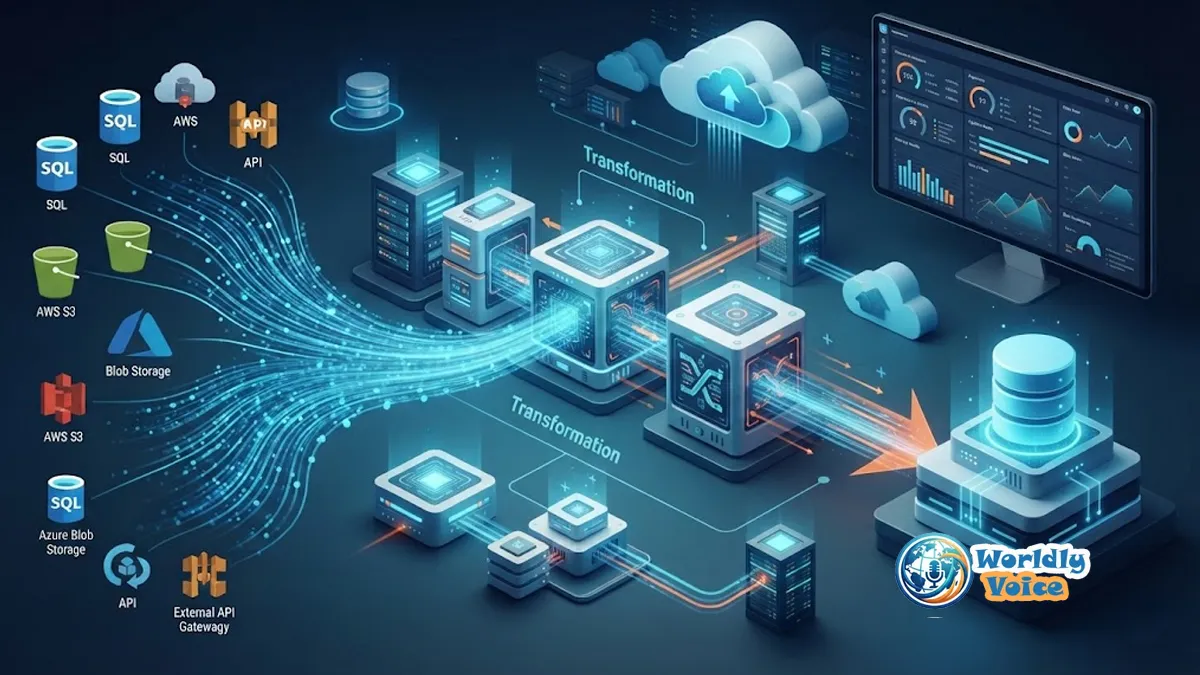
Slow data pipelines rarely fail for just one reason. A dashboard may be stale because the source system is being scanned unnecessarily. A Spark job may spend most of its time shuffling skewed data. A warehouse load may crawl because millions of tiny files are being written. Meanwhile, cloud costs keep climbing.
I have found that the most effective approach is not to throw more compute at the problem. It is to measure first, find the bottleneck, and then remove the unnecessary work. That is the foundation of ETL process optimization.
ETL means Extract, Transform, Load. But optimizing ETL means looking at the entire workflow: data movement, transformation logic, storage, orchestration, infrastructure, reliability, and cost.
There are three goals worth tracking:
- Speed: lower runtime and latency while increasing throughput.
- Cost: reduce compute, storage, network, and processing waste.
- Reliability: reduce failures, retries, recovery time, and data-quality incidents.
These goals can conflict. The fastest solution is not always the cheapest, and the cheapest pipeline is not useful if it repeatedly misses its SLA.
1. What Is ETL Process Optimization?
In practical terms, ETL optimization means making a pipeline do less unnecessary work and do its necessary work more efficiently.
That includes:
- Extracting only required data
- Transforming data with efficient operations
- Loading in batches rather than individual records
- Running independent tasks in parallel
- Using storage formats that support efficient reads
- Right-sizing compute resources
- Monitoring bottlenecks and regressions
- Building reliable recovery and data-quality controls
I think of an ETL pipeline like a delivery network. Buying faster trucks will not solve a problem caused by sending every package through the wrong warehouse. First, we need to identify where the delay occurs.
A fast pipeline that produces duplicate or incorrect records is not optimized. Neither is a reliable pipeline that costs five times more than necessary.
For teams beginning data pipeline optimization, this distinction matters. The objective is better business performance, not simply a smaller runtime number.
2. Measure Before You Optimize
The first rule I follow is simple: do not optimize blindly.
AWS recommends establishing performance goals, measuring metrics, identifying bottlenecks, reducing their impact, and repeating the process.
Start with a baseline containing:
| Metric | Baseline | Target | Why It Matters |
|---|---|---|---|
| End-to-end runtime | 95 min | 45 min | SLA and freshness |
| Data processed | 800 GB | 220 GB | Scan efficiency |
| Throughput | 140 GB/hr | 300 GB/hr | Pipeline capacity |
| CPU utilization | 42% | 65–80% | Resource efficiency |
| Shuffle/spill | 180 GB | <50 GB | Transformation cost |
| Failure rate | 6% | <1% | Reliability |
| Cost/run | $18 | $10 | Cloud efficiency |
Track extraction, transformation, loading, and orchestration separately. Otherwise, a 90-minute pipeline tells you almost nothing about the real problem.
Also capture CPU, memory, disk, network, records processed, bytes scanned, retries, freshness, and recovery time.
One practical rule helps: change one major variable at a time. If you simultaneously change the partition strategy, cluster size, SQL logic, and file format, you may get a faster run but learn nothing about why it improved.

3. Find the Real ETL Bottleneck
Once the baseline exists, diagnose the symptom.
| Symptom | Likely Cause | First Fix | Metric to Watch |
|---|---|---|---|
| Extraction is slow | Full-table reads | Incremental loading | Bytes extracted |
| Transform is slow | Expensive joins/UDFs | Set-based operations | Stage runtime |
| Loading is slow | Row-by-row writes | Bulk loading | Rows/sec |
| High shuffle | Skewed joins | Repartition carefully | Shuffle volume |
| Too many files | Tiny output partitions | Compaction | File count |
| High cost | Oversized cluster | Right-size/autoscale | Cost/run |
This diagnostic model prevents a common mistake: treating every performance problem as an infrastructure problem.
When extraction is the bottleneck
Look for full-table scans, inefficient source queries, network limitations, database contention, and SaaS API rate limits.
When transformation is the bottleneck
Look for row-by-row processing, expensive Python UDFs, large joins, skew, excessive shuffling, repeated calculations, and filters applied too late.
When loading is the bottleneck
Look for single-row inserts, excessive index maintenance, poor partitioning, inefficient file formats, and non-idempotent writes.
When cost is the problem
Look for full refreshes, idle workers, over-provisioned clusters, excessive storage, and unnecessary cross-region data movement.
The principle is straightforward: fix the largest source of waste first.
4. Optimize the Extraction Stage
The fastest record to process is the record you never move.
That makes incremental data loading one of the highest-value improvements available.
Instead of extracting an entire customer table every night, use a high-water mark such as:
WHERE updated_at > last_successful_timestampA more mature architecture can use Change Data Capture (CDC), including log-based CDC, to capture inserts, updates, and deletes as they happen.
Timestamp-based extraction is easy to implement but requires careful handling of late-arriving updates and deletes. CDC is more suitable when low latency and accurate change tracking matter, although it introduces additional operational complexity.
Other improvements include:
- Select only required columns.
- Filter at the source.
- Avoid
SELECT *. - Use query pushdown where supported.
- Read from replicas when appropriate.
- Parallelize API extraction without violating rate limits.
- Use partitioned JDBC reads for large relational sources.
AWS specifically documents pushdown as a way to move filtering closer to the source, reducing unnecessary network transfer and processing.
For practical ETL performance tuning techniques, this is an important lesson: reducing data volume often produces a larger improvement than adding compute.
5. Optimize Data Transformations
Transformations are where many pipelines consume the majority of their compute.
I have seen a simple architectural change make a bigger difference than hours of infrastructure tuning: replacing row-by-row logic with set-based processing.
Instead of:
for each customer:
    calculate status
use a SQL operation that calculates the result for the entire dataset.
Also:
- Filter early.
- Remove unused columns.
- Avoid repeated calculations.
- Prefer vectorized operations where appropriate.
- Cache small, frequently reused reference datasets.
- Reduce unnecessary shuffles.
- Investigate skewed joins.
- Use partitioning deliberately.
- Avoid expensive UDFs unless they are genuinely necessary.
These techniques can speed up data transformation workflows because they reduce the amount of work each executor must perform.
A simple before-and-after example
Before: Read 1 billion rows, select 40 columns, join everything, then filter to the last seven days.
After: Filter to seven days at the source, select six required columns, then join the smaller dataset.
The second design is not merely “better SQL.” It changes the amount of data moving through the entire pipeline.
AWS guidance similarly emphasizes reducing data scans, parallelizing tasks, optimizing shuffles, and minimizing planning overhead.
This is also where the ETL vs. ELT optimization decision becomes important. If a modern analytical warehouse can perform the transformation efficiently at scale, pushing SQL transformations into the warehouse may be simpler and faster than moving data into a separate processing layer.
Traditional ETL still makes sense when transformation must happen before loading, when source data requires complex preprocessing, or when security and architectural constraints require separation.
6. Optimize the Loading Stage
A pipeline can extract and transform efficiently yet still spend most of its time writing results.
The biggest improvement is usually replacing individual inserts with bulk or batch operations.
Depending on the destination, that could mean COPY, bulk INSERT, staged files, warehouse-native loading, or an equivalent high-throughput mechanism.
Storage design matters too.
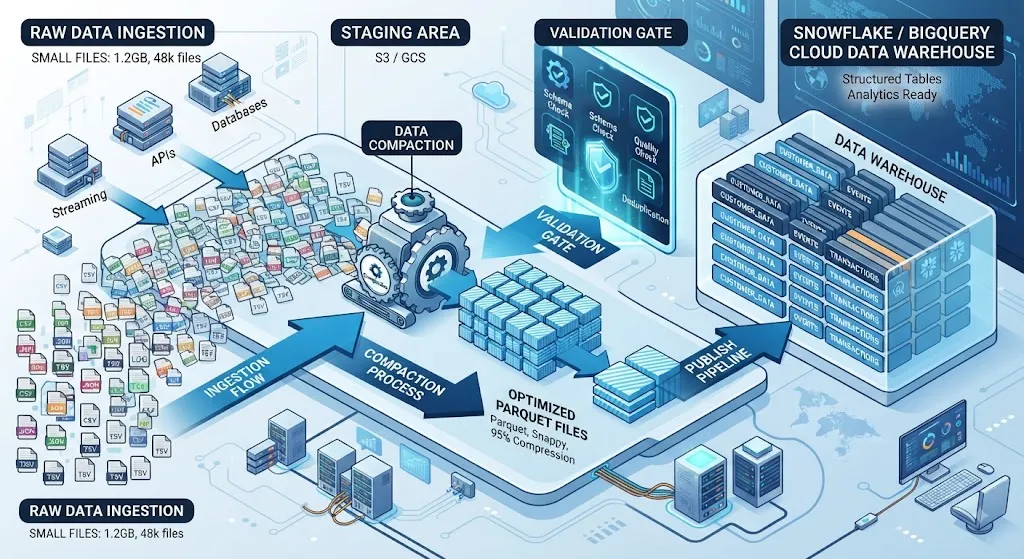
Parquet and ORC are columnar formats designed for analytical workloads. They support compression and parallel reads, and predicate pushdown can allow engines to skip unnecessary data blocks.
Also watch the small-file problem.
Writing millions of tiny files creates metadata overhead and forces query engines to perform unnecessary file-management work. Compaction can combine them into appropriately sized files.
A reliable loading pattern is:
Stage → Validate → Publish
This makes failures easier to recover from and supports idempotent processing.
If a job runs twice, it should not quietly duplicate yesterday’s records.
7. Parallel Processing and Pipeline Scaling
Scaling does not simply mean adding more machines.
Horizontal scaling increases the number of workers. Vertical scaling increases the capacity of each worker. The right choice depends on the workload.
Compute-heavy workloads may benefit from horizontal parallelism. Memory-intensive transformations may require larger workers.
Partitioning is central to both.
A good partition key distributes work evenly. A poor key can create one enormous partition while hundreds of workers sit idle.
The best practices for data pipeline scaling are therefore workload-specific:
- Partition data evenly.
- Avoid highly skewed keys.
- Parallelize independent tasks.
- Use autoscaling when workload volume varies.
- Monitor resource utilization before changing worker counts.
- Match worker types to CPU, memory, and I/O requirements.
- Calculate performance gains against infrastructure cost.
Do not increase cluster size simply because a job is slow. If the job is spending most of its time waiting on a database or shuffling skewed data, more workers may accomplish very little.
8. Batch ETL vs. Streaming ETL
Not every pipeline needs real-time processing.
Batch processing is often ideal for scheduled reporting, historical workloads, and large daily transformations.
Micro-batching sits between batch and streaming. It processes data frequently while retaining some batch-oriented characteristics.
Streaming ETL makes sense when latency directly affects the business, such as fraud detection, operational monitoring, personalization, or event-driven applications.
Streaming introduces additional concerns around ordering, backpressure, state, consistency, replay, and failure recovery.
The right architecture is therefore part of optimization. There is little value in building a complex streaming system when a dependable hourly batch already meets the business requirement.
9. Orchestration Optimization
Orchestration can become an invisible bottleneck.
Suppose five independent tasks each take ten minutes. If the scheduler runs them sequentially, the workflow spends roughly 50 minutes on work that could potentially finish in about 10 minutes, excluding scheduling overhead.
Remove unnecessary dependencies. Run independent tasks concurrently.
Keep orchestrator tasks lightweight. Heavy transformations generally belong in Spark, a warehouse, or another dedicated processing engine rather than inside the scheduler itself.
Also design for:
- Safe retries
- Idempotent jobs
- Efficient backfills
- Concurrency limits
- Event-driven triggering
- Restartable stages
- Clear dependency graphs
For example, Apache Airflow 3.3.0 was released on July 6, 2026. The release added stateful tasks, expanded asset partitioning, multi-language task support, and pluggable retry policies.
That evolution reflects a broader trend: orchestration is becoming more data-aware and distributed, but the underlying principle remains the same—do not make the scheduler perform work better handled by the processing engine.
10. Storage, Partitioning, and Modern Table Formats
Partitioning should follow access patterns, not tradition.
Partitioning every table by date may seem sensible, but excessive partitioning can create too many files and metadata operations. Conversely, insufficient partitioning can force large scans.
Apache Iceberg adds another layer of table-management capabilities for large analytical datasets. Its 1.11.0 release, published May 19, 2026, introduced remote scan planning through the REST Catalog, allowing catalog servers to plan scans and return relevant file tasks.
That matters because modern data pipeline optimization is increasingly about managing metadata and file planning as well as raw compute.
The same principle applies to compression, compaction, partition pruning, and file sizing: optimize the whole storage path, not one setting in isolation.
11. Monitoring and Observability
Optimization is not a one-time project.
A pipeline that runs in 30 minutes today may take 70 minutes after six months of data growth.
Build dashboards around:
- Stage-level runtime
- Input and output volume
- CPU and memory
- Disk and network I/O
- Shuffle and spill
- Streaming backpressure
- Error and retry rates
- Data freshness
- SLA compliance
- Cost per run
Use regression detection where possible. If a deployment increases runtime by 25%, treat it as an engineering signal rather than waiting for users to complain.
This is the operational side of ETL process optimization: measure continuously so improvements survive future code and data changes.
12. Data Quality Is Part of Performance
Fast bad data is still bad data.
Schema contracts, type validation, deduplication, quarantine tables, schema evolution controls, and idempotent writes protect the value of an optimized pipeline.
Imagine reducing a six-hour job to 90 minutes, only to discover that a type-conversion bug corrupted 8% of the records. The runtime improvement is irrelevant.
Reliability should therefore be measured alongside speed and cost.
13. Choose the Right Processing Engine
There is no universal “best” ETL engine.
| Workload | Suitable Choice | Why |
|---|---|---|
| Large distributed transformations | Apache Spark | Parallel processing and complex transformations |
| Low-latency streaming | Apache Flink | Event-time and streaming workloads |
| Warehouse-native transformations | Warehouse SQL/ELT | Uses scalable analytical compute |
| Smaller analytical workloads | DuckDB or Polars | Low infrastructure overhead |
| Workflow coordination | Apache Airflow | Scheduling and orchestration |
Apache Spark 4.2.0 was released on July 14, 2026, alongside newer maintenance releases in the 4.0 and 4.1 lines.
But version numbers should not drive architecture decisions. Start with workload characteristics.
A 50-GB transformation does not automatically need a large distributed cluster.
14. A Practical ETL Optimization Workflow
Here is the playbook I would use when approaching a slow pipeline:
- Define the runtime, cost, throughput, and reliability target.
- Capture a baseline.
- Separate extraction, transformation, loading, and orchestration timings.
- Identify the largest bottleneck.
- Reduce unnecessary data movement.
- Optimize source queries and transformation logic.
- Improve partitioning and parallelism.
- Optimize storage and loading.
- Right-size infrastructure.
- Re-run the same workload.
- Compare runtime, cost, throughput, quality, and reliability.
- Document the change.
- Add monitoring to prevent regression.
That sequence matters.
If a pipeline processes 10 TB unnecessarily, adding twice the compute is usually treating the symptom. Reducing that 10 TB to 500 GB changes the economics of every downstream stage.
Frequently Asked Questions
What is ETL process optimization?
It is the systematic improvement of extraction, transformation, loading, orchestration, storage, infrastructure, cost, and reliability. The goal is not simply faster execution; it is better performance without sacrificing correctness or operational stability.
Why is my ETL pipeline running slowly?
Start by measuring each stage. Full-table extraction, expensive joins, skewed partitions, excessive shuffling, small files, serial orchestration, slow destinations, and insufficient resources are common causes.
How can incremental loading improve performance?
Incremental loading processes only new or changed records instead of repeatedly scanning the entire dataset. High-water marks and CDC are common approaches.
What are the best ETL performance tuning techniques?
The highest-impact techniques usually include reducing data scanned, predicate pushdown, set-based transformations, efficient joins, balanced partitioning, bulk loading, file compaction, parallel processing, and workload-aware scaling.
How does partitioning improve ETL performance?
Good partitioning lets processing and query engines isolate relevant data and distribute work. Poor partitioning can create skew, excessive metadata, and too many small files.
How do you reduce ETL cloud costs?
First reduce unnecessary data movement and computation. Then right-size workers, use autoscaling where appropriate, optimize storage, eliminate idle resources, and measure cost per successful pipeline run.
Conclusion
The best pipelines are not necessarily the ones with the largest clusters or newest frameworks. They are the ones that understand where time, money, and reliability are being lost.
In my experience, the most sustainable approach to ETL process optimization starts with a baseline. Then we identify the bottleneck, reduce unnecessary work, improve the data flow, and only afterward adjust infrastructure.
That mindset also makes it easier to Optimize ETL data pipelines as volumes grow. Instead of reacting when a dashboard becomes stale, we can see degradation early through metrics, cost monitoring, freshness checks, and regression alerts.
The practical goal is simple: move less data, perform less unnecessary work, parallelize what can be parallelized, store data intelligently, and build workflows that can recover cleanly.
For readers working across cloud architecture, related decisions such as AWS vs Azure Comparison can also influence networking, storage, and compute economics. And when performance problems extend beyond the pipeline itself, understanding Tech Ideas That Made the Web Move Quicker can provide useful context around distributed systems and infrastructure evolution.
For further technical reading, AWS provides detailed guidance on ETL performance tuning techniques, including data-scan reduction, parallelization, shuffle optimization, and UDF tuning. Its guidance on incremental processing and efficient storage formats is also useful when redesigning production pipelines. AWS additionally documents predicate pushdown for ETL reads, which illustrates why filtering data closer to its source can have such a significant effect.
