



If you’ve ever needed one VPN user to always get the same IP address, while another user gets access to a different subnet, the client config dir feature in OpenVPN is exactly where I would start. In my experience, this is the point where a basic VPN setup becomes a managed, predictable remote-access system.
OpenVPN’s Client Config Directory, often shortened to CCD, lets us define server-side rules for individual VPN clients. Instead of pushing the same routes, IP behavior, and access rules to everyone, we can create one small file per client and control what that specific client receives.
CCD can be useful when developers need access to staging servers, contractors need limited access to a specific subnet, or administrators need stable VPN addresses for firewall rules.
This guide walks through how the client-config-dir directive works, how to configure it safely, and how to avoid the mistakes that usually cause IP conflicts, route confusion, or certificate-name mismatches.

1. What Is Client Config Dir in OpenVPN?
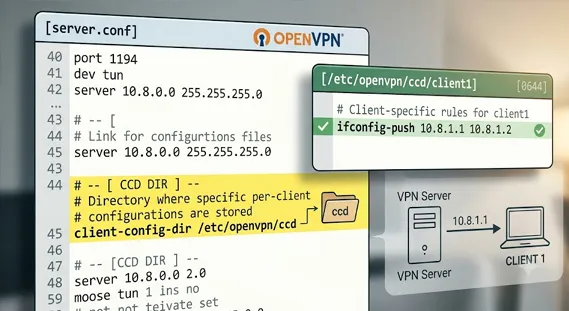
The client config dir is a directory on the OpenVPN server that stores per-client configuration files. Each file corresponds to one VPN client and must match the client certificate’s Common Name, often called the CN.
For example, if a client certificate has this Common Name:
textCopy
client1Then the matching CCD file should usually be:
textCopy
/etc/openvpn/ccd/client1Inside that file, we can place directives that apply only to that client.
The most common uses are:
- Assigning a static VPN IP address
- Pushing client-specific routes
- Giving one user access to a private subnet
- Restricting another user from sensitive networks
- Supporting site-to-site style OpenVPN routing
- Creating predictable firewall policies
The server activates this feature with the directive:
confCopy
client-config-dir /etc/openvpn/ccdThat line usually goes inside the OpenVPN server configuration file, often named:
textCopy
server.confor on some Linux distributions:
textCopy
/etc/openvpn/server/server.confThe official client-config-dir documentation from OpenVPN explains the directive in detail, but the practical idea is straightforward: OpenVPN checks the client’s certificate Common Name, looks for a matching file in the CCD directory, and applies the directives found there.
2. Why Use CCD Instead of Only Global Server Settings?
A standard OpenVPN server configuration applies the same behavior to all clients. That is fine for simple VPN access.
But real networks are rarely that simple.
In one setup we tested, all users initially received addresses from the same VPN pool and inherited the same pushed routes. It worked until the security team asked a reasonable question:
“Why can every VPN user reach every internal subnet?”
That is where openvpn advanced access control becomes important.
With CCD, we can treat users, devices, or branch offices differently. A developer might need access to 10.20.0.0/24. A finance user might need 10.30.0.0/24. A contractor might only need one jump host.
This is much cleaner than maintaining one broad global configuration.
Global Config vs Client Config Directory
| Feature | Global OpenVPN Config | Client Config Directory |
|---|---|---|
| IP assignment | Usually dynamic from VPN pool | Static per client |
| Routes | Same routes pushed to everyone | Custom routes per client |
| Access control | Broad and limited | Fine-grained |
| Firewall rules | Harder to make predictable | Easier with fixed VPN IPs |
| Scaling | Simple at first | Better for managed environments |
| Risk | Over-permissive access | Misconfiguration if undocumented |
If your site also publishes technical infrastructure content, this is a natural place to reference related resources like Linux server hardening checklist, VPN router setup guide, or even performance-focused content such as Best Laptop GPUs for 4K Video Editing when discussing workstation-heavy remote teams.
3. How OpenVPN Matches CCD Files to Client Certificates
The most important CCD rule is this:
The filename must match the client certificate Common Name.
This is where many configuration issues begin.
If the client certificate CN is:
textCopy
alice-laptopThen the CCD file should be:
textCopy
/etc/openvpn/ccd/alice-laptopNot:
textCopy
alice
alice.ovpn
Alice-Laptop
Linux filesystems are case-sensitive, so Alice-Laptop and alice-laptop are different names.
This is why certificate management matters. If you use Easy-RSA to generate client certificates, pay attention to the Common Name during certificate creation. The common name certificate openvpn relationship is central to CCD behavior.
In my experience, when CCD “doesn’t work,” the cause is often one of these:
- The CCD directory path is wrong.
- The filename does not match the certificate CN.
- File permissions prevent OpenVPN from reading the file.
- The server was not restarted or reloaded.
- The directive conflicts with the server’s topology mode.
- Another route or firewall rule blocks the traffic.
4. Basic OpenVPN Client Config Dir Example
Let’s start with a clean, practical openvpn client config dir example.
Assume the OpenVPN server network is:
textCopy
10.8.0.0/24And we want client1 to always receive:
textCopy
10.8.0.10Server configuration
Add this to your OpenVPN server config:
confCopy
client-config-dir /etc/openvpn/ccdDepending on your system, the file might be located at:
textCopy
/etc/openvpn/server.confor:
textCopy
/etc/openvpn/server/server.confOn many Ubuntu and Debian systems using systemd, newer package layouts commonly use the second path.
Create the CCD directory:
bashCopy
sudo mkdir -p /etc/openvpn/ccdSet safe permissions:
bashCopy
sudo chown root:root /etc/openvpn/ccd
sudo chmod 755 /etc/openvpn/ccd
CCD file for client1
Create the per-client file:
bashCopy
sudo nano /etc/openvpn/ccd/client1Add:
confCopy
ifconfig-push 10.8.0.10 255.255.255.0This is an ifconfig-push static ip assignment. When client1 connects, OpenVPN should assign that client the address 10.8.0.10.
Then restart OpenVPN:
bashCopy
sudo systemctl restart openvpn-server@serverThe exact service name can vary. On some systems, it may be:
bashCopy
sudo systemctl restart openvpn@serverTo inspect logs:
bashCopy
sudo journalctl -u openvpn-server@serverThis simple openvpn client config dir setup is often the foundation for more advanced routing.
5. Assigning Static IPs with CCD
Static VPN addresses are one of the most common reasons we use CCD.
A dynamic VPN pool is fine when users only need general access. But fixed IPs are much better when you need:
- Per-user firewall rules
- Reliable logging
- Easier troubleshooting
- Stable monitoring rules
- Access policies tied to one VPN identity
Example:
confCopy
ifconfig-push 10.8.0.20 255.255.255.0This tells OpenVPN to assign 10.8.0.20 to the matching client.
However, there is one important planning rule:
Do not assign an address that overlaps with your dynamic pool.
For example, if your server configuration includes:
confCopy
server 10.8.0.0 255.255.255.0OpenVPN manages a pool inside that subnet. To avoid conflicts, many admins reserve a portion of the subnet for CCD clients, such as:
textCopy
10.8.0.10 - 10.8.0.99   Static CCD clients
10.8.0.100 - 10.8.0.250 Dynamic clients
You can manage the dynamic pool range with additional OpenVPN options, but the key idea is simple: document your address plan before adding many CCD files.
I’ve seen teams lose hours because two clients were accidentally assigned the same VPN IP. OpenVPN logs usually expose the problem, but the outage still feels avoidable.
6. Pushing Custom Routes to Individual VPN Clients
The next major use case is vpn client custom routes.
Let’s say client1 should access the office LAN:
textCopy
192.168.1.0/24The CCD file can include:
confCopy
ifconfig-push 10.8.0.10 255.255.255.0
push "route 192.168.1.0 255.255.255.0"
Now client1 receives both a static VPN address and a route to the office LAN.
This is useful when not every VPN user should receive the same route. For example:
- Developers get access to staging.
- Support gets access to monitoring.
- Finance gets access to accounting systems.
- Contractors get access to one isolated subnet.
That said, routing alone is not security. It controls where traffic tries to go. You should still enforce access with firewall rules on the VPN server, internal routers, cloud security groups, or host-based firewalls.
OpenVPN can distribute routes, but Linux, pfSense, OPNsense, AWS, Azure, or your internal firewall decides whether traffic is actually allowed.
7. Using CCD for Site-to-Site Routing
The client config dir ccd pattern becomes even more useful when one OpenVPN client represents an entire remote network.
Imagine a branch office connects to headquarters through OpenVPN. The branch LAN is:
textCopy
192.168.50.0/24The OpenVPN client certificate Common Name is:
textCopy
branch-office-1The CCD file would be:
textCopy
/etc/openvpn/ccd/branch-office-1Inside it:
confCopy
iroute 192.168.50.0 255.255.255.0You may also need a corresponding server-side route:
confCopy
route 192.168.50.0 255.255.255.0Here is the difference:
routetells the OpenVPN server host about the network.iroutetells OpenVPN which connected client owns that network.
This distinction matters. Without iroute, the server may know the network exists but not know which VPN tunnel should receive the traffic.
The OpenVPN project has long supported this kind of routed VPN architecture, and it remains common in Linux-based remote-access and site-to-site deployments.
8. Practical CCD File Examples
Here are several short examples I commonly use as templates.
Example A: Static IP only
confCopy
ifconfig-push 10.8.0.11 255.255.255.0Use this when the client needs a predictable VPN address.
Example B: Static IP plus one route
confCopy
ifconfig-push 10.8.0.12 255.255.255.0
push "route 192.168.10.0 255.255.255.0"
Use this for a user who needs access to one internal subnet.
Example C: Branch office network behind client
confCopy
iroute 192.168.60.0 255.255.255.0Use this when the VPN client is a router or gateway for another LAN.
Example D: Different DNS for one client
confCopy
push "dhcp-option DNS 10.10.10.10"Use this when a client needs a special resolver, such as a DNS server for a lab or restricted network.
Example E: Limited access design
CCD alone does not deny all other access. For tighter control, pair the static VPN IP with firewall rules.
For example:
textCopy
client2 gets 10.8.0.22
Firewall allows 10.8.0.22 only to 192.168.20.15:443
This is a clean model for contractors and vendors.
9. Best Practices for a Safe CCD Setup
A working setup is not always a safe setup. Here are the habits I recommend.
Keep CCD files in a predictable location
The standard path is:
textCopy
/etc/openvpn/ccdThis keeps the configuration easy to find and document.
Use clear certificate Common Names
Good names:
textCopy
alice-laptop
finance-router-1
branch-office-nyc
Poor names:
textCopy
client
test
user1
Clear names make troubleshooting easier months later.
Document every static IP
Maintain a small table in your internal documentation:
| Client CN | VPN IP | Routes | Purpose |
|---|---|---|---|
| alice-laptop | 10.8.0.10 | 192.168.1.0/24 | Admin access |
| dev-team-1 | 10.8.0.20 | 10.20.0.0/24 | Staging access |
| vendor-a | 10.8.0.30 | 192.168.40.10/32 | Vendor portal |
This prevents address conflicts and makes audits easier.
Test one client first
Do not roll out ten CCD files at once. I prefer testing with one low-risk client, checking logs, confirming routes, and then expanding.
Protect permissions
Only trusted administrators should edit CCD files.
Recommended:
bashCopy
sudo chown -R root:root /etc/openvpn/ccd
sudo chmod 755 /etc/openvpn/ccd
sudo chmod 644 /etc/openvpn/ccd/*
If someone can modify CCD files, they may be able to change routing behavior or gain access to networks they should not reach.
Pair CCD with firewall rules
CCD is configuration. Firewalls enforce boundaries.
Use Linux iptables, nftables, cloud firewalls, or dedicated network appliances to make sure static VPN IPs only reach approved destinations.
10. Common Problems and How to Fix Them
Problem: The client does not get the static IP
Check:
- Does the CCD filename match the certificate CN?
- Is the server using the correct
client-config-dirpath? - Did you restart or reload OpenVPN?
- Are permissions readable by the OpenVPN process?
Logs usually reveal the mismatch.
Problem: The route is pushed but traffic fails
Check:
- Is IP forwarding enabled on the server?
- Does the internal network know how to return traffic to the VPN subnet?
- Is NAT required?
- Is a firewall blocking the connection?
Routing is two-way. The client may know how to reach the LAN, but the LAN must know how to reply.
Problem: Site-to-site routing does not work
Check for both:
confCopy
route 192.168.50.0 255.255.255.0in the server config and:
confCopy
iroute 192.168.50.0 255.255.255.0in the correct CCD file.
This is a common openvpn server conf ccd issue.
Problem: Two users have the same IP
Audit all files in:
textCopy
/etc/openvpn/ccdSearch for duplicate ifconfig-push addresses. Then assign unique addresses and reconnect the affected clients.
11. Security Considerations Before Deployment
CCD gives us precision, but precision requires discipline.
The main risks are:
- IP address conflicts
- Overlapping routes
- Incorrect Common Names
- Overly broad pushed routes
- Insecure file permissions
- Lack of firewall enforcement
- Poor documentation
Most OpenVPN administrators agree on one point: CCD should be treated as part of your access-control design, not just a convenience feature.
I also recommend reviewing CCD changes the same way you review firewall changes. A one-line route can expose an internal subnet to the wrong user.
For high-trust environments, combine CCD with:
- Certificate revocation lists
- Multi-factor authentication where supported
- Centralized logging
- Least-privilege firewall rules
- Regular access reviews
This is especially important for hybrid teams using VPNs across development, design, and media-production workflows. If your site covers technical gear, references like Best Laptop GPUs for 4K Video Editing can sit alongside infrastructure articles to support readers building secure remote workstations.
FAQs About OpenVPN Client Config Dir
1. What does client config dir do in OpenVPN?
The client config dir lets the OpenVPN server apply custom settings to individual clients. It is commonly used for static IPs, custom routes, and per-client access behavior.
2. Where is the CCD directory located?
A common location is:
textCopy
/etc/openvpn/ccdHowever, you can choose another path as long as the server configuration points to it with the client-config-dir directive.
3. Why is my CCD file not working?
The most common reason is a filename mismatch. The CCD filename must match the client certificate Common Name exactly. Also check permissions, service restarts, and the OpenVPN logs.
4. Can I use CCD to restrict client access?
Partly. CCD can control assigned IPs and pushed routes, but true access restriction should be enforced with firewall rules. For example, assign a static IP with CCD, then allow that IP to reach only approved subnets.
5. What is the difference between route and iroute?
route tells the server operating system about a network. iroute tells OpenVPN which VPN client owns that network. Site-to-site setups often need both.
6. Is CCD useful for remote creative or technical teams?
Yes. Teams using secure workstations, Linux servers, or performance-heavy devices covered in topics like Clevo NH70 Review and remote workstation security can use CCD to provide controlled VPN access by role or device.
Conclusion: Build Predictable OpenVPN Access with CCD
The client config dir feature turns OpenVPN from a shared-access tunnel into a precise access-control system. With one directory and one file per client, we can assign static IPs, push custom routes, support branch networks, and build firewall rules that actually stay reliable.
The key is consistency.
Match CCD filenames to certificate Common Names. Keep /etc/openvpn/ccd secure. Document every static IP. Test changes before scaling. And always pair routing decisions with firewall enforcement.
In my experience, CCD is one of the most practical ways to make OpenVPN easier to manage as teams grow. Whether you are supporting administrators, developers, branch offices, or remote creative users reading resources like Best Laptop GPUs for 4K Video Editing, a clean CCD design gives your VPN structure instead of guesswork.
