


A fast fiber connection can only perform as well as the equipment distributing it around your home. The right Fiber Internet Router helps turn that high-speed connection into reliable Wi-Fi and wired networking for your phones, computers, TVs, game consoles, and other devices.
There is one important detail to understand from the start: fiber does not always connect directly to an ordinary Wi-Fi router. In many full-fiber installations, an Optical Network Terminal (ONT) converts the incoming optical signal into a connection your router can use.
So, choosing the right router is less about finding a device with the word “fiber” on the box and more about matching its ports, wireless technology, coverage, and processing capability to your actual internet plan and home.
What Is a Fiber Internet Router?
A Fiber Internet Router is the device that manages and distributes your internet connection throughout your local network. In a typical setup, the router connects to an ONT using Ethernet and then provides:
- Wi-Fi connectivity
- Wired Ethernet connections
- Local network management
- Network security features
- Guest networks
- Parental controls
- Traffic prioritization and QoS features
- Connections for multiple devices
The router usually does not convert light traveling through a fiber cable into Ethernet data. That job is generally handled by the ONT.
A typical home setup looks like this:
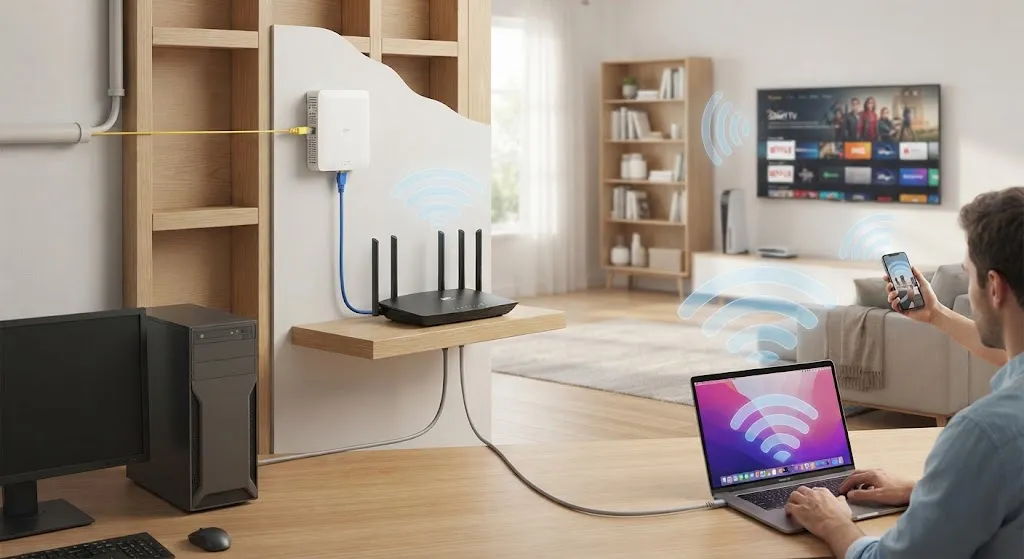
Fiber line → ONT → Ethernet cable → Router → Wi-Fi and wired devices
This distinction matters because people often use the words modem, ONT, and router interchangeably even though they perform different jobs.
Do You Need a Special Router for Fiber Internet?
Do you need a special router for fiber internet? Usually, no.
If your ISP’s ONT provides a standard Ethernet connection, many modern routers can work with the service. The more important question is whether the router can handle the speed and configuration requirements of your connection.
For example, a basic router with a 1Gbps WAN port may work perfectly well for a 500Mbps fiber plan. It may, however, limit a 2Gbps or 5Gbps service.
What to match with your internet plan
| Fiber plan | Recommended router capability |
|---|---|
| Up to 300Mbps | Quality Wi-Fi 5 or Wi-Fi 6 |
| 500Mbps–1Gbps | Wi-Fi 6 or newer with Gigabit WAN/LAN |
| 1–2.5Gbps | 2.5Gbps WAN recommended |
| 2.5–5Gbps | Multi-gig WAN and LAN |
| 5–10Gbps | High-end multi-gig or 10Gbps networking |
An ONT compatible router does not necessarily need a special fiber connector. If the ONT hands off the connection through Ethernet, the router’s WAN or Internet port is normally what matters.
Before buying anything, check with your ISP about requirements such as PPPoE login credentials, VLAN settings, or whether its supplied gateway must remain connected.
Fiber Optic Modem vs Router Differences
Understanding the fiber optic modem vs router differences can prevent a lot of unnecessary purchases.
Strictly speaking, an ONT is not identical to a traditional cable or DSL modem. However, it performs a similar role from the customer’s perspective by terminating the service connection and making it usable by home networking equipment.
| Feature | ONT / Fiber Terminal | Router |
|---|---|---|
| Connects to the fiber service | Yes | Usually no |
| Handles optical network signal | Yes | Usually no |
| Provides Ethernet handoff | Usually | Yes, through LAN ports |
| Creates a local network | Limited or no | Yes |
| Provides Wi-Fi | Sometimes in a combined gateway | Yes |
| Manages home traffic | Usually no | Yes |
| Connects many local devices | Limited | Yes |
Openreach, for example, describes an ONT as the device that converts the fiber signal entering a home into a connection the router can use.
What about an ISP gateway?
Some providers combine several functions into one device. Their equipment may act as an ONT, router, Wi-Fi access point, and sometimes a telephone gateway.
In that situation, you may still be able to use your own router, but the setup could require bridge mode, access-point mode, or ISP-specific configuration.
How to Choose the Best Wi-Fi Router for Fiber Optic Internet
The best wi-fi router for fiber optic internet is not automatically the one with the highest advertised wireless number. Start with the connection entering your home and work outward.
Check the WAN port first
The WAN port receives the internet connection from your ONT or gateway.
A router with only a 1Gbps WAN port cannot fully pass a 2.5Gbps internet service through that single connection.
For multi-gig plans, look for:
- 2.5Gbps WAN
- 5Gbps WAN
- 10Gbps WAN
Also remember that your wired devices need compatible ports to exceed Gigabit Ethernet speeds.
Consider the Wi-Fi standard
Wi-Fi 6 remains a practical choice for many homes, especially with gigabit or slower fiber plans. It offers good efficiency for busy households without requiring the price of the newest hardware.
Wi-Fi 6E adds access to the 6GHz band where it is supported and where compatible devices are available.
Wi-Fi 7 introduces newer capabilities including wider channels and Multi-Link Operation (MLO), which can improve throughput, latency, and reliability on compatible devices. The Wi-Fi Alliance identifies MLO, 320MHz channels where 6GHz spectrum is available, and 4K QAM among key Wi-Fi 7 capabilities.
The important qualification is compatibility: buying a Wi-Fi 7 router does not instantly make an older laptop or phone operate as a Wi-Fi 7 device.
Think about coverage, not just speed
A high-speed home network router located at one end of a large house may still leave distant rooms with weak Wi-Fi.
Consider:
- Home size
- Number of floors
- Wall materials
- Router placement
- Number of connected devices
- Outdoor or garage coverage needs
A single router may be enough for a small or open-plan property. Larger homes often benefit from a mesh system.
For readers troubleshooting devices that keep disconnecting, WorldlyVoice’s guide to wireless printer network problems also illustrates how weak Wi-Fi and changes to a router or mesh setup can affect devices differently.
Wi-Fi 6 vs Wi-Fi 6E vs Wi-Fi 7 for Fiber Internet
There is no single winner for every household.
Wi-Fi 6: the sensible choice for many gigabit homes
Choose Wi-Fi 6 if:
- Your plan is 1Gbps or below
- Your budget matters
- Most of your devices are Wi-Fi 6 or older
- You need reliable everyday performance
A good gigabit Wi-Fi router can still deliver an excellent experience for streaming, gaming, remote work, and multiple users.
Wi-Fi 6E: useful for compatible devices
Wi-Fi 6E can be attractive if you own compatible devices and want access to the 6GHz band. Its value depends partly on local spectrum availability and your device ecosystem.
Wi-Fi 7: best suited to demanding or future-focused networks
A Wi-Fi 7 router for fiber internet makes the most sense for households with multi-gig service, newer devices, heavy simultaneous usage, or plans to keep the router for several years.
It can also be useful when high-speed local networking matters—for example, transferring files to a NAS or workstation.
The router itself should still match the internet service. Paying for a premium 10Gbps router while subscribing to a modest 100Mbps plan is unlikely to improve everyday browsing.
Top Performing Gigabit Routers for Home Network
Current 2026 recommendations cover several categories rather than one universal winner. Independent testing currently lists the TP-Link Archer BE900 among high-end standalone choices for fiber because of its multi-gig connectivity and strong wireless performance, while also noting that such hardware can be excessive for ordinary gigabit plans.
Here are several router types and models worth considering.
TP-Link Archer BE900: premium multi-gig option
The TP-Link Archer BE900 is a high-end Wi-Fi 7 router with dual 10Gbps connectivity options, multiple 2.5Gbps ports, and quad-band wireless capability.
It makes the most sense for:
- Multi-gig fiber subscribers
- Homes with demanding wireless use
- High-speed NAS or workstation networking
- Users who need substantial wired capacity
For a standard 500Mbps plan, however, much of this hardware would be unnecessary.
TP-Link Archer BE9700: strong multi-gig alternative
The TP-Link Archer BE9700 specifications show a Wi-Fi 7 design with a 10Gbps WAN/LAN port and additional 2.5Gbps ports.
This type of configuration is useful when both the internet connection and the local network need speeds above 1Gbps.
NETGEAR Nighthawk Wi-Fi 7 range
NETGEAR’s 2026 Nighthawk Wi-Fi 7 guide shows a range extending from entry-level multi-gig models to the high-end RS700S with 10Gbps connectivity.
That illustrates an important buying principle: the right router depends on coverage, connected devices, and wired speed requirements—not simply on choosing the most expensive model.
Mesh Wi-Fi for larger homes
For multi-story homes or properties with persistent dead zones, the best mesh Wi-Fi for fiber internet may be more useful than one extremely powerful standalone router.
A mesh system places multiple nodes around the home. For best results, consider Ethernet backhaul where practical, especially with fast fiber service. Wireless backhaul can work well, but wired connections preserve more wireless capacity for client devices.

Best Router for 1Gbps, 2.5Gbps, and Multi-Gig Fiber
Best router for 1 gig fiber
For most 1Gbps plans, prioritize:
- Gigabit WAN and LAN ports
- Wi-Fi 6 or better
- Reliable coverage
- Enough processing power for your household
- WPA3 and current security support
A quality Wi-Fi 6 model can still be the most cost-effective choice.
For 2.5Gbps fiber
A 2.5Gbps router should have at least a compatible 2.5Gbps WAN port. Ideally, it should also provide 2.5Gbps LAN where you need fast wired access.
Otherwise, your internet connection may be faster than the ports connecting your devices.
For 5Gbps and 10Gbps fiber
Look for:
- 5Gbps or 10Gbps WAN
- Suitable multi-gig LAN ports
- A powerful processor
- Wi-Fi 7 for high-end wireless use
- Adequate cooling
- Mesh capability if coverage is extensive
At these speeds, local network design becomes more important. Your Ethernet cables, switches, computers, and storage equipment may also become bottlenecks.
Single Router vs Mesh Wi-Fi for Fiber
A single router is often the better choice for:
- Apartments
- Small homes
- Open layouts
- Centrally located networking equipment
A mesh system may be better for:
- Large houses
- Multiple floors
- Thick walls
- Long or unusual layouts
- Persistent Wi-Fi dead zones
Do not assume mesh automatically means faster internet. Its primary advantage is coverage and consistency.
For example, a single router may deliver extremely high speeds in the living room but poor performance upstairs. A well-positioned mesh system may provide lower peak speeds near the main router while delivering a much better experience across the entire home.
How to Connect a Router to Fiber Internet
A basic fiber internet router setup is usually straightforward.
1. Locate the ONT or ISP gateway
Your provider may have installed a separate ONT on a wall or near the entry point for the fiber service.
2. Find the active Ethernet port
The ISP may specify which LAN port provides the internet handoff.
3. Connect it to the router’s WAN port
Use a suitable Ethernet cable from the ONT or gateway to the router’s WAN or Internet port.
4. Complete ISP configuration
Depending on the provider, the router may need:
- Automatic DHCP
- PPPoE credentials
- VLAN tagging
- A specific WAN configuration
Do not guess these settings. Use your ISP’s documentation if the connection does not work automatically.
5. Test wired performance first
Before judging Wi-Fi, connect a capable computer directly by Ethernet.
If the wired speed is correct but Wi-Fi is slow, the problem is likely within the wireless network rather than the fiber service itself.
For a broader example of how device hardware can limit overall system performance, WorldlyVoice’s HP laptop specifications and troubleshooting guide can be useful when checking whether an older computer’s networking hardware is part of the limitation.
Common Fiber Router Problems
Slow Wi-Fi despite fast fiber
Check:
- Distance from the router
- Walls and interference
- The Wi-Fi band being used
- Device Wi-Fi capability
- Router placement
A 2Gbps fiber plan does not mean every phone will receive 2Gbps over Wi-Fi.
The router is the bottleneck
Check the WAN and LAN port speeds. A 1Gbps port can limit faster service.
Coverage is poor
Try moving the router to a more central, elevated location. If the layout remains difficult, consider mesh networking.
ISP gateway conflicts
If you add your own router behind an ISP gateway, you may encounter double NAT or other configuration issues. Bridge or passthrough options depend on the provider’s equipment.
Ethernet is slower than expected
Check:
- Port negotiation speed
- Cable quality and category
- Network adapter capability
- Intermediate switches
- Whether the computer actually supports multi-gig Ethernet
Frequently Asked Questions
Can I use any router with fiber internet?
Usually, yes, if your ISP provides an ONT with Ethernet output and the router supports the required WAN configuration. Confirm ISP-specific requirements before replacing provider equipment.
Does fiber internet need a modem?
Fiber installations commonly use an ONT rather than a traditional cable or DSL modem. Some providers combine the ONT and router functions in one gateway.
Is Wi-Fi 7 necessary for a 1Gbps fiber plan?
No. A good Wi-Fi 6 router can be sufficient for many 1Gbps households. Wi-Fi 7 may make sense if you want newer technology, have compatible devices, or expect future upgrades.
Why am I not getting my full fiber speed over Wi-Fi?
Wi-Fi performance depends on distance, interference, router placement, wireless bands, and device capability. Test with Ethernet to separate an ISP problem from a wireless limitation.
Is a mesh system better than a single router?
Not always. Mesh is generally better for difficult or large coverage areas. A single well-positioned router may be simpler and faster for a smaller home.
What ports should I look for on a multi-gigabit router?
For internet plans above 1Gbps, look for a WAN port matching or exceeding your service speed. Also consider 2.5Gbps, 5Gbps, or 10Gbps LAN ports for devices that need faster wired networking.
Choosing the Right Fiber Internet Router
The right Fiber Internet Router is the one that matches your actual connection and home—not necessarily the model with the largest speed number.
For a standard 1Gbps plan, a dependable Wi-Fi 6 router with Gigabit Ethernet may provide everything your household needs. For 1–2.5Gbps service, multi-gig ports become much more important. For 5Gbps and faster connections, you should examine the entire network, including switches, Ethernet adapters, and client devices.
Coverage deserves equal attention. A premium router cannot overcome every thick wall or awkward floor plan. In larger homes, a properly designed mesh network may provide a better everyday experience.
Before buying, check three things: your ISP speed, your router’s WAN/LAN port speeds, and your home’s coverage requirements. Those details will narrow the options far more effectively than advertised Wi-Fi numbers alone.
