


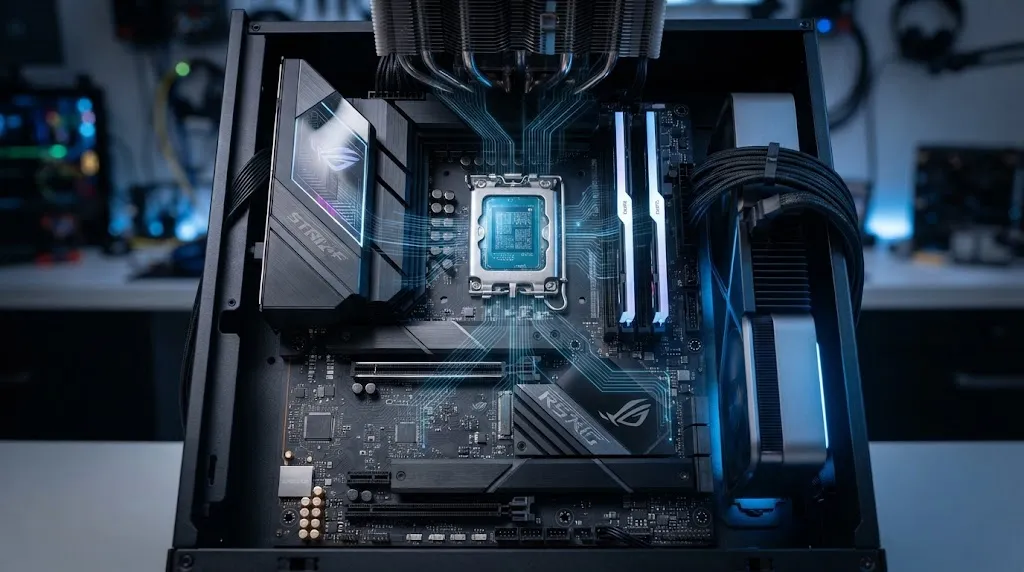
If you have ever wondered what does the CPU do on a computer, the short answer is this: the CPU, or Central Processing Unit, executes instructions, processes data, performs calculations and logical operations, and helps coordinate the work required by software and other hardware.
That is why the CPU is often described as the brain of a computer. The analogy is not perfect, because a computer depends on many components working together, but it does help explain the CPU’s importance. When you open an application, type a document, browse the web, calculate a number, or launch a game, the processor is involved in processing the instructions that make those activities possible.
Modern CPUs are much more sophisticated than the simple processors found in older computers. They can contain multiple cores, several levels of cache, advanced instruction-processing circuitry, and support for multiple hardware threads. Yet the basic idea remains surprisingly straightforward: the CPU receives instructions, processes them, and produces results.
What Is a CPU?
CPU stands for Central Processing Unit. It is the primary general-purpose processing component in a computer and is responsible for executing program instructions and handling many computational operations.
The Central Processing Unit meaning becomes easier to understand if you think of a computer program as a set of instructions. Software tells the computer what needs to happen, but those instructions must ultimately be processed by hardware. The CPU performs much of that work.
For example, when you open a web browser, the CPU may process instructions related to launching the application, managing its processes, handling user input, running parts of the browser’s code, and communicating with other system components.
According to IBM’s explanation of the CPU, the CPU is a primary functional component that executes program instructions and supports operating-system and application operations.
A CPU does not work alone. It communicates and cooperates with components such as:
- RAM, which holds data and instructions currently being used
- Storage, which keeps files and programs for long-term use
- GPU, which specializes in graphics and highly parallel workloads
- Input devices, such as keyboards and mice
- Output devices, such as monitors and printers
- Motherboard and controllers, which provide connections between components
The result is a complete computer system in which the CPU serves as a major general-purpose processing element.
What Does the CPU Do on a Computer?
The CPU’s primary job is to execute instructions.
Almost every software activity can eventually be broken down into instructions that a processor must execute. These instructions can tell the CPU to perform a calculation, compare values, move data, make a decision, or perform another operation supported by the processor’s instruction set.
The main functions of a processor include:
- Executing software instructions
- Performing arithmetic calculations
- Performing logical comparisons
- Processing data
- Managing computational tasks
- Working with memory
- Coordinating operations with other hardware
- Supporting multiple running applications and processes
Consider a simple example. You open a calculator application and enter 5 + 5. The application needs instructions for receiving the numbers, performing the addition, and displaying the result. The CPU executes the relevant instructions, while RAM, the display system, and other hardware participate in the overall process.
Real applications are vastly more complicated, but the principle is similar.
The processor repeatedly handles instructions while the computer is running. That activity allows your operating system and applications to respond to what you do.
The Role of CPU in a Computer System
The role of CPU in computer system operation goes beyond performing arithmetic.
A modern computer can have dozens or hundreds of processes active in the background. The operating system manages those processes and schedules work for the available CPU resources.
For example, while you are browsing the internet, your computer may simultaneously be:
- Processing keyboard and mouse input
- Running browser processes
- Managing background services
- Checking network activity
- Handling file operations
- Updating applications
- Running security software
The CPU processes instructions associated with these activities. However, it is important not to think of the CPU as physically doing every task itself. Specialized hardware can handle particular workloads, and the operating system coordinates how resources are used.
This distinction matters because modern computers are heterogeneous systems. Different processors and components are designed for different types of work.
The CPU is generally optimized for flexible, general-purpose processing, making it particularly valuable for tasks involving complex control logic, branching, and a wide variety of instructions.
How Does a CPU Work? A Simple Explanation
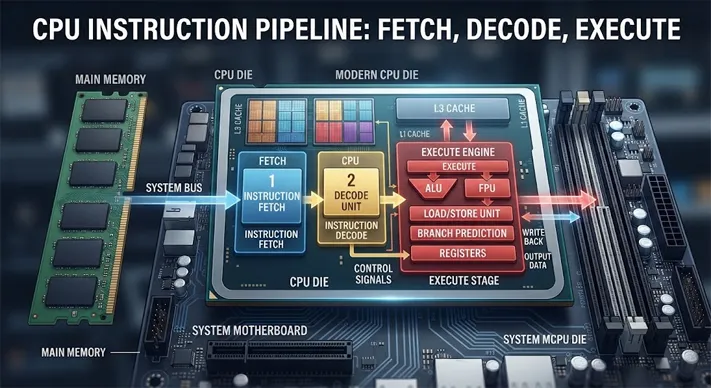
A useful how CPU works simple explanation starts with the fetch-decode-execute cycle.
At a simplified level, the processor repeatedly performs three fundamental steps:
1. Fetch
The CPU obtains the next instruction it needs to process from the computer’s memory system.
2. Decode
The processor interprets the instruction and determines what operation it represents.
3. Execute
The CPU performs the required operation.
For some instructions, the resulting information then needs to be written back to a register, cache, or memory.
Intel’s educational explanation of microprocessors describes the basic fetch, decode, and execute sequence used to explain how processors handle instructions.
Modern processors make this process considerably more sophisticated. They can use techniques such as pipelining, which allows different stages of multiple instructions to be in progress at the same time. They also use prediction and other architectural techniques to keep their execution units busy.
So, while the fetch-decode-execute model is simplified, it provides an excellent foundation for understanding how a processor works.
What Are the Main Parts of a CPU?
CPU designs differ between architectures and generations, but several important components and concepts help explain how processors perform their work.
Arithmetic Logic Unit (ALU)
The Arithmetic Logic Unit (ALU) performs arithmetic and logical operations.
Arithmetic operations include tasks such as addition and subtraction. Logical operations include comparisons and other operations used to evaluate conditions.
For instance, software may need to determine whether one value is greater than another. The CPU can execute instructions that perform that comparison.
Control Unit
The control unit contains circuitry involved in directing instruction processing. It helps coordinate the various operations required to execute instructions correctly.
It does not mean that the CPU independently decides what a user wants. Instead, the processor follows instructions supplied by software and the operating system.
Registers
Registers are very small and extremely fast storage locations within the processor.
They hold information that the CPU needs immediately, such as operands, addresses, or intermediate results. Because registers are part of the processor’s execution environment, accessing them is much faster than retrieving information from slower levels of the memory hierarchy.
CPU Cache Memory
CPU cache memory is high-speed memory designed to keep frequently needed instructions and data close to the processing cores.
Modern CPUs commonly have multiple cache levels, such as L1, L2, and L3. The exact arrangement varies between processor designs.
Cache helps reduce the time the CPU would otherwise spend waiting for frequently used information to arrive from slower memory.
Cores
A CPU core is an individual processing unit within a processor.
A modern processor can have multiple cores, allowing the system to execute multiple streams of work concurrently. How much this improves performance depends heavily on the software and workload.
A program that can divide its work efficiently across multiple cores can benefit substantially. A task that depends mainly on one processing thread may not scale in the same way.
Threads
A thread represents a sequence of instructions that can be scheduled for execution.
Modern CPUs may support multiple hardware threads per physical core. This can allow a core to keep its resources more effectively utilized when one thread is waiting for certain operations.
However, a thread is not equivalent to a full physical CPU core. More threads do not automatically produce the same performance increase as adding physical cores.
How the CPU Works With RAM and Storage
One of the easiest ways to understand a computer is to stop thinking of the CPU as an isolated component.
CPU and RAM
RAM provides relatively fast temporary storage for information that programs are actively using.
When an application runs, the system needs access to its instructions and data. The CPU works with the memory hierarchy to obtain the information required for processing.
CPU cache sits closer to the processing cores and can provide faster access to frequently used information than main memory.
CPU and storage
SSDs and hard drives provide long-term storage for operating systems, applications, documents, photos, and other files.
When you launch a program, information stored on the storage device must become available to the running system. The CPU then executes the instructions required to operate the application.
This is one reason upgrading from an older hard drive to a faster SSD can make a computer feel much more responsive even when the CPU has not changed.
CPU and the motherboard
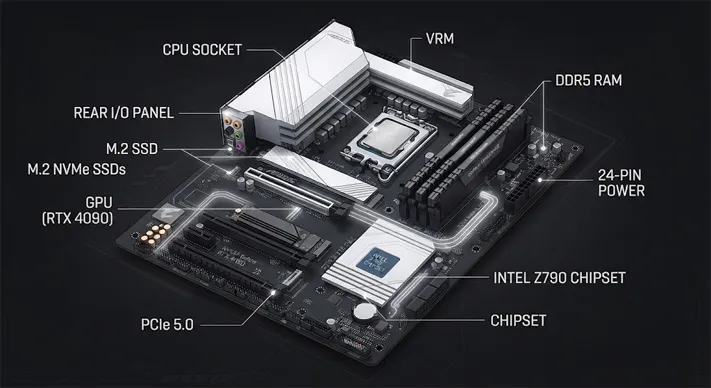
The motherboard provides the physical and electrical platform that allows the CPU to communicate with RAM, storage, expansion devices, and other system components.
Modern systems also contain controllers and interfaces that help manage these connections.
What Is the Difference Between CPU and GPU?
The difference between CPU and GPU is mainly about what each processor is optimized to do.
A CPU is a flexible general-purpose processor. A GPU is designed to perform large amounts of similar work in parallel, making it particularly effective for graphics and other workloads that can be divided into many simultaneous operations.
AMD’s CPU and GPU architecture explanation explains that CPUs are designed for fast, low-latency processing while GPUs are designed to execute many similar threads in parallel for high throughput.
| Feature | CPU | GPU |
|---|---|---|
| Primary purpose | General-purpose processing | Parallel processing and graphics acceleration |
| Core design | Relatively fewer, powerful cores | Many parallel processing units |
| Strength | Flexible and complex workloads | Large numbers of similar calculations |
| Common uses | Operating systems, applications, general computing | Graphics, video, AI and parallel workloads |
| Processing approach | Strong at sequential and branching work | Strong at highly parallel workloads |
The two are therefore complementary rather than direct replacements.
For example, in a modern game, the CPU may handle game logic, physics-related calculations, operating-system tasks, and other instructions, while the GPU handles large amounts of graphics rendering.
If you are interested in how graphics hardware fits into a modern PC, our gaming graphics card guide provides a deeper look at GPUs, VRAM, graphics workloads, and choosing a card for different resolutions. This is the strongest directly relevant internal-link opportunity I found on the provided websites.
Why Is the CPU Called the Brain of a Computer?
The phrase brain of the computer is mainly an analogy.
The CPU executes instructions that allow operating systems and applications to perform their work. That makes it one of the most important components in a conventional computer.
However, calling it the brain should not imply that the CPU does everything.
A computer is a coordinated system. RAM provides working memory, storage retains information, the GPU handles graphics and other parallel workloads, and various controllers manage communication with peripherals.
The CPU is better described as a central general-purpose processing component rather than a component that independently controls every aspect of the machine.
That distinction becomes increasingly important as computers use specialized accelerators for particular workloads.
Does a Faster CPU Make a Computer Faster?
A faster or more capable CPU can make a computer faster, but CPU clock speed alone does not determine overall performance.
Several factors influence CPU performance:
- CPU architecture
- Number of cores
- Number of hardware threads
- Clock frequency
- Cache design
- Instruction-set capabilities
- Power and thermal limits
- Software optimization
- Memory performance
What Is CPU Clock Speed?
CPU clock speed describes the frequency at which a processor’s clock operates and is commonly expressed in gigahertz (GHz).
A higher clock speed can be beneficial, but comparing processors purely by GHz can be misleading.
Two CPUs operating at different frequencies may perform different amounts of work during each clock cycle because of architectural differences.
For this reason, when comparing CPUs, it is better to consider real benchmarks for the specific applications you use rather than assuming that the processor with the highest GHz rating will always be fastest.
CPU Cores and Threads: Why They Matter
If you have looked at CPU specifications, you have probably seen terms such as 8-core/16-thread or 12-core/24-thread.
The first number normally refers to physical processing cores. The second describes the number of hardware threads supported by the processor.
More cores can be particularly useful for workloads that can be divided into independent tasks, such as:
- Video rendering
- Software compilation
- 3D rendering
- Heavy multitasking
- Certain scientific workloads
- Some content-creation applications
For ordinary browsing, email, office work, and many everyday applications, adding more cores does not necessarily produce a proportional improvement.
The workload matters as much as the specification.
When Does the CPU Matter Most?
The CPU becomes especially important when a task depends heavily on general-purpose computation.
Examples include:
- Running multiple applications
- Compiling software
- Processing large spreadsheets
- Database workloads
- Certain simulations
- Video encoding
- Complex productivity applications
- CPU-intensive games
- Professional applications with strong CPU scaling
However, a computer can also be limited by another component.
A computer with a powerful CPU but insufficient RAM may struggle with heavy multitasking. A system with a fast CPU and slow storage may still take a long time to load applications. A gaming computer with a weak GPU may have limited graphics performance even if its CPU is excellent.
This is why evaluating a complete system is usually more useful than judging one specification in isolation.
A Simple Real-World Example
Imagine opening a photo-editing application.
Several things happen behind the scenes.
First, the application is loaded from storage. The operating system places the required information into working memory. The CPU then executes the instructions needed to run the application.
When you apply an adjustment, some operations may be performed by the CPU while other workloads can be accelerated by a GPU or another specialized component.
The result appears on your monitor after the relevant processing is completed.
From the user’s perspective, it looks like one action: click a button.
Inside the computer, however, that action can involve the operating system, CPU, RAM, storage, GPU, drivers, and display hardware.
That is the most useful way to think about modern computing: the CPU is central, but it is part of a team.
Frequently Asked Questions
What does a CPU do in simple words?
A CPU processes instructions. It performs calculations, logical operations, and other tasks required by software while working with memory and other hardware.
Is the CPU the brain of the computer?
It is commonly called the brain of the computer because it executes program instructions and performs general-purpose processing. The phrase is an analogy, though, because a complete computer relies on many components.
What is the difference between CPU and GPU?
A CPU is designed for flexible, general-purpose processing, while a GPU is designed to perform large numbers of similar calculations in parallel. Both can work together in modern computers.
Does more CPU cores mean a faster computer?
Not necessarily. More cores can improve performance in workloads that can use them effectively, but software design, architecture, clock speeds, memory, and other factors also influence performance.
Is CPU clock speed important?
Yes, but it is only one performance factor. Architecture and the amount of useful work a CPU can complete per clock cycle also matter.
Does the CPU control RAM and storage?
The CPU works with the system’s memory and storage subsystems to process instructions and data, but modern computers use dedicated controllers and interfaces as part of this process. It is more accurate to say the CPU interacts with and relies on these components rather than directly controlling every operation.
Conclusion
So, what does the CPU do on a computer? It executes instructions, performs calculations and logical operations, processes data, and supports the operation of software and the wider computer system.
The role of CPU in computer system performance is therefore much broader than simply doing mathematics. It helps run the operating system, applications, background processes, and many of the instructions generated by your everyday interactions with a computer.
The easiest how CPU works simple explanation is the fetch-decode-execute cycle. The processor retrieves an instruction, interprets it, and executes it—repeating this process continuously while the computer performs its work.
Modern CPUs add multiple cores, threads, cache levels, sophisticated prediction, pipelining, and other technologies to improve efficiency and performance. At the same time, GPUs and specialized accelerators take on workloads for which parallel processing is particularly effective.
That is also why the difference between CPU and GPU matters. The CPU is designed for flexible general-purpose processing, while the GPU specializes in highly parallel workloads. Together with RAM, storage, the motherboard, and other hardware, they form the system that turns software instructions into the actions you see on screen.
Understanding the CPU is therefore not just about memorizing technical terms. It gives you a better foundation for understanding why computers perform differently, what hardware specifications actually mean, and which components matter for the tasks you care about.
