



We rarely think about what happens between tapping a link and seeing a webpage. I certainly don’t—until a page takes too long to respond. Then every second becomes noticeable.
That tiny delay is the result of a surprisingly complex journey involving servers, networks, protocols, browsers, caches, and sometimes hundreds of individual resources. The story of 8 tech ideas that made the web move quicker is really the story of engineers repeatedly finding ways to remove one delay after another.
When we look at the tech ideas that made the web move quicker, one pattern becomes clear: the web did not become fast because of one revolutionary invention. It became faster because data became smaller, servers moved closer to users, connections became more efficient, browsers became smarter, and developers learned to measure what people actually experience.
Let’s trace those innovations—and see how they still shape the modern web.
1. HTTP Created a Common Language for the Web
The first breakthrough was deceptively simple: browsers and servers needed a standardized way to communicate.
HTTP, or Hypertext Transfer Protocol, became that common language. A browser could request a resource, and a server could return it. HTML documents, images, CSS, JavaScript, and other resources could travel through the same basic communication model.
Early HTTP was far less sophisticated than today’s web. As websites became more complex, however, repeated connections and request overhead became increasingly important performance concerns.
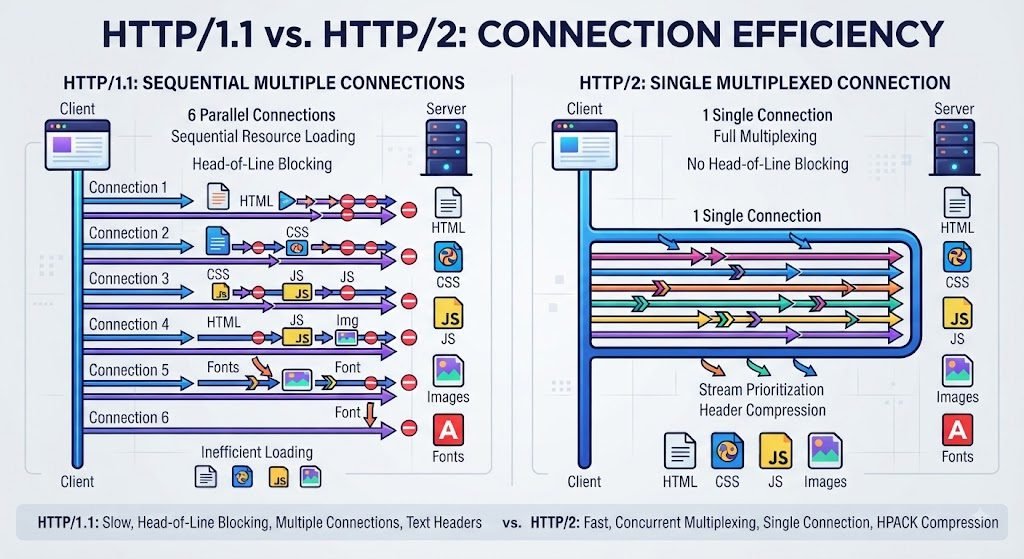
HTTP/1.1 introduced persistent connections, allowing multiple requests to reuse a connection rather than establishing a completely new connection for every resource.
Then came HTTP/2 in 2015. It changed how HTTP messages were framed and transported while preserving the familiar semantics developers already understood. HTTP/2 added multiplexing and header compression, allowing multiple streams to share a connection more efficiently.
I think of this evolution like improving a road system. The destination did not change. The traffic system did.
Milestone: HTTP → HTTP/1.1 → HTTP/2 → HTTP/3.
2. Browser Caching: Don’t Download What You Already Have
One of the smartest ideas in web performance optimization is also one of the least glamorous: remember things.
Suppose you visit a website and download its logo, stylesheet, font, or JavaScript bundle. Why should your browser download the same file again five minutes later?
It shouldn’t.
HTTP caching allows browsers and intermediary caches to reuse responses. Headers such as Cache-Control, ETag, and Last-Modified help determine when stored content can be reused or when it needs validation.
This has two benefits.
First, the user waits less. A cached resource can often be reused locally without another trip across the network.
Second, the server does less work. A request that never reaches the origin server is one less request the infrastructure needs to process.
That gives us a useful rule for understanding how the internet became faster:
The fastest network request is often the one we don’t have to make.
This principle extends beyond browsers. Reverse proxies, application caches, and edge caches all apply the same basic idea at different layers.
A practical example
Imagine an online magazine with the same 200 KB stylesheet on every article.
Without effective caching, every page visit could require another download.
With sensible caching, the browser may already have that stylesheet. The page can immediately reuse it.
That is not a faster internet connection. It is smarter information reuse.

3. Content Delivery Networks Brought Content Closer
Physics has always been part of web performance.
If a user in Singapore requests content from a server thousands of kilometers away, the request has to travel that distance. No software trick can completely eliminate the underlying physical path.
Content delivery networks (CDNs) changed the equation.
A CDN distributes content across geographically separated servers, often called edge servers. Popular resources can be served from a location closer to the person requesting them.
The result can be lower latency and a faster response, particularly for globally distributed audiences. Modern CDN architectures can also support HTTP/2, HTTP/3, compression, image optimization, security features, and edge computing.
When I explain this concept simply, I use a library analogy.
Imagine a publisher keeping every book in one warehouse. Customers around the world would wait for shipments from that warehouse. Now imagine placing popular books in local branches. The books haven’t changed. The distance has.
That is essentially what CDNs do for frequently requested web resources.
This is one of the most important technologies that accelerated the internet, especially as websites became global.
4. Compression: Send Fewer Bytes
There is another obvious question engineers eventually had to ask:
What if we simply sent less data?
Compression answers it.
HTML, CSS, JavaScript, JSON, SVG, and other text-based resources often contain repeated patterns. Compression algorithms can represent that information using fewer bytes.
Gzip became a long-standing standard for HTTP content delivery, while Brotli later offered strong compression efficiency for many web resources. MDN notes that Brotli can provide better compression ratios than gzip, although compression speed and workload still matter when choosing an approach.
The principle is straightforward:
Less data → less bandwidth → less transfer time.
This is why browser caching and compression work so well together. Compression reduces the first transfer; caching can eliminate later transfers entirely.
Newer approaches continue to explore ways of reducing repeated information. Compression Dictionary Transport, for example, is designed to let compatible clients and servers reuse dictionaries when compressing responses. Its browser availability remains limited, so it is better viewed as an emerging technique rather than a universal replacement for established compression.
The larger lesson from the history of web performance optimization is that bandwidth is a resource. Efficient websites respect it.
5. HTTP/2 Multiplexing Made Multiple Requests More Efficient
Modern webpages rarely consist of a single file.
Open almost any complex site and you may find HTML, CSS, JavaScript, images, fonts, analytics resources, advertisements, and third-party integrations all competing for network attention.
Older HTTP patterns could make this process inefficient.
HTTP/2 introduced multiplexing, allowing multiple streams to travel through the same connection. It also introduced HPACK header compression to reduce repetitive header overhead.
Think of the difference between sending ten separate delivery trucks and using one organized freight system carrying multiple shipments.
HTTP/2 doesn’t magically make every website faster in every circumstance. Performance depends on network conditions, server configuration, resource priorities, caching, and the structure of the page.
But it gave the web a much more efficient communication mechanism.
That became one of the defining milestones in web speed evolution.
Why this mattered to developers
HTTP/2 allowed many existing websites to benefit from protocol improvements without changing the fundamental meaning of HTTP.
The browser still requests resources.
The server still responds.
But the conversation became more efficient underneath.
6. QUIC and HTTP/3 Improved Transport Efficiency
HTTP/2 solved important problems, but it still commonly operated over TCP.
That mattered when packets were lost.
With HTTP/2’s multiplexed streams sharing a TCP connection, packet loss could create connection-level head-of-line blocking. QUIC approached the transport problem differently.
QUIC runs over UDP and provides multiplexed streams, flow control, loss recovery, and low-latency connection establishment. HTTP/3 maps HTTP semantics onto QUIC. The Internet Engineering Task Force standardized HTTP/3 as RFC 9114 in 2022.
In simple terms, imagine several trains traveling through the same railway system. If one train is delayed, you don’t necessarily want every other train to stop.
QUIC’s stream-oriented design helps isolate certain packet-loss effects between streams rather than allowing one lost packet to stall the entire connection.
This is particularly relevant on mobile and unpredictable networks, where latency and packet loss can vary significantly.
HTTP/3 is therefore one of the clearest recent tech ideas that made the web move quicker, although its real-world benefit still depends on the network, server, browser, and workload.
7. Front-End Optimization Reduced What Browsers Had to Download and Process
Network speed isn’t the whole story.
A page can receive its data quickly and still feel slow because the browser has too much work to perform.
That is why modern internet speed optimization increasingly includes front-end decisions such as:
- Responsive images
- Modern image formats
- Lazy loading
- JavaScript code splitting
- Tree shaking
- Minification
- Deferred scripts
- Font optimization
- Preloading critical resources
- Reducing render-blocking resources
- Removing unnecessary third-party scripts
Consider a news homepage viewed on a phone.
The visitor does not need every image at desktop resolution. They probably don’t need below-the-fold content immediately. They certainly don’t need a dozen unrelated scripts blocking the first meaningful content.
Good performance means prioritizing the work that matters now.
This is also where the distinction between “fast internet” and “fast website” becomes important.
Your connection might be excellent. But if a page sends a 5 MB hero image, loads unnecessary JavaScript, and waits for several third-party services, the experience can still be poor.
The best optimization therefore asks:
What does the user need first?
That question is more useful than simply asking how many files a website contains.
8. Performance Measurement Turned Speed Into Something We Could Manage
The final innovation is measurement.
For years, developers could say a webpage “felt slow.” Modern performance engineering gives us much better ways to understand why.
Today we can examine metrics such as:
- TTFB — Time to First Byte
- LCP — Largest Contentful Paint
- INP — Interaction to Next Paint
- CLS — Cumulative Layout Shift
- JavaScript execution time
- Resource loading
- Network latency
- Rendering delays
Google’s Core Web Vitals currently focus on LCP for loading performance, INP for responsiveness, and CLS for visual stability. Recommended “good” thresholds include LCP of 2.5 seconds or less, INP of 200 milliseconds or less, and CLS of 0.1 or less, evaluated at the 75th percentile.
TTFB is also useful diagnostically because it measures the time from navigation start until the first response byte begins arriving. High TTFB can affect the metrics that follow it.
This changed my understanding of performance.
Speed is not one number.
A page can have a respectable network response but poor interactivity. Another can render quickly but shift content unexpectedly. A third might have excellent cached performance but a slow first visit.
Measurement lets us identify the actual bottleneck instead of guessing.
If you’re troubleshooting a website, that mindset is far more valuable than chasing arbitrary performance scores.
A quick view of the eight innovations
| Innovation | What it improved | Main performance idea |
|---|---|---|
| HTTP | Browser-server communication | Standardized resource delivery |
| Browser caching | Repeat visits | Avoid unnecessary downloads |
| CDNs | Geographic distance | Move content closer |
| Compression | Data transfer | Send fewer bytes |
| HTTP/2 | Multiple requests | Multiplex streams efficiently |
| QUIC + HTTP/3 | Transport behavior | Reduce connection and blocking costs |
| Front-end optimization | Browser workload | Deliver only what matters |
| Performance measurement | Optimization decisions | Find and fix real bottlenecks |

How the Internet Became Faster: The Bigger Picture
When we put these eight ideas together, the answer becomes much clearer.
Protocols became more efficient. HTTP evolved from simple request-response communication toward multiplexed HTTP/2 and QUIC-based HTTP/3.
Data became smaller. Compression reduced the number of bytes crossing the network.
Content moved closer. CDNs reduced the practical distance between users and resources.
Repeated work disappeared. Browser and server-side caches prevented unnecessary transfers and processing.
Browsers became smarter. Resource prioritization, lazy loading, and responsive media reduced unnecessary work.
Developers started measuring reality. Core Web Vitals and real-user data made performance observable instead of subjective.
This is the central lesson from the history of web performance optimization: speed is a systems problem.
A useful page might simultaneously use CDN caching, compressed assets, HTTP/3, optimized images, browser caching, prioritized resources, and real-user monitoring.
None of these technologies has to work alone.
They reinforce each other.
For example, a static image can be compressed, stored at a CDN edge, transferred over HTTP/3, cached by the browser, and requested with an appropriate priority. Each layer removes a different kind of delay.
What These Tech Ideas Mean for Websites Today
The eight innovations also explain why modern web performance is more nuanced than simply buying a faster server.
If your server is slow, improve backend processing and TTFB.
If users are geographically distant, consider a CDN.
If pages transfer too many bytes, compress and optimize assets.
If repeat visits are slow, inspect caching.
If the page arrives quickly but feels sluggish, investigate JavaScript and rendering.
If users experience layout movement or delayed interactions, look at Core Web Vitals.
I also find it useful to separate lab performance from real-world performance. A developer testing on a powerful laptop and fast connection can see a very different experience from a visitor using an older phone on an unstable mobile network. Google’s guidance emphasizes field data precisely because real users encounter conditions that controlled testing cannot fully reproduce.
That is where related subjects such as AnonVault Explained, Error Code 211 Marvel Rivals, and How to Configure OpenVPN Client Config Dir can fit naturally into a broader technical content strategy: different topics may serve different search intents, but each benefits from clear explanations, efficient delivery, and thoughtful information architecture. Even a content-focused site should treat Ahrefs traffic for guest posts as a signal to study—not as a substitute for actual user experience.
FAQs About Web Speed Evolution
What made the internet faster?
There was no single invention. HTTP improvements, caching, CDNs, compression, HTTP/2, QUIC, HTTP/3, front-end optimization, and better measurement all contributed.
Is HTTP/3 faster than HTTP/2?
It can improve performance, particularly under higher latency or packet-loss conditions, because HTTP/3 uses QUIC rather than TCP. Actual results depend on network conditions and implementation.
Why is browser caching so important?
Caching allows browsers to reuse resources they already downloaded. That can reduce network requests, waiting time, bandwidth usage, and origin-server work.
Do CDNs make every website faster?
Not automatically. CDN effectiveness depends on geography, cacheability, configuration, traffic patterns, and the site’s architecture. Their main advantage is reducing the distance between users and content.
What are Core Web Vitals?
They are Google’s user-focused performance metrics for loading, responsiveness, and visual stability: LCP, INP, and CLS.
What should I optimize first?
Start with real measurements. Look at TTFB, Core Web Vitals, resource sizes, caching, CDN behavior, and JavaScript execution. Fix the largest bottleneck rather than optimizing whatever happens to be easiest.
Conclusion
The story of 8 tech ideas that made the web move quicker is ultimately a story about eliminating waste.
Caching eliminated repeated downloads. Compression reduced bytes. CDNs reduced distance. HTTP/2 improved multiplexed communication. QUIC and HTTP/3 modernized transport. Front-end optimization reduced unnecessary browser work. Measurement showed us where users were actually waiting.
Together, these technologies that accelerated the internet transformed the web without requiring one magical breakthrough.
We went from asking, “How fast is the connection?” to asking a much better question:
How quickly can a real person get useful, stable, interactive content?
That shift matters.
Whether you’re maintaining a large application or a small publishing site, the most useful lesson from the milestones in web speed evolution is to optimize the complete journey—not just the server.
Measure first. Cache intelligently. Send fewer bytes. Put content closer to users. Use modern protocols where appropriate. Prioritize what people need immediately.
That is how the web keeps moving quicker.
Trusted References
- HTTP caching — MDN’s technical guidance on browser and intermediary caching.
- Core Web Vitals — Google’s web.dev guidance on LCP, INP, CLS, and field measurement.
- RFC 9114: HTTP/3 — IETF specification describing HTTP/3 over QUIC.
